In professional environments, LED panel failures aren't just inconvenient — they're costly. Catching the early warning signs before a full failure can mean the difference between a quick module swap and an emergency service call mid-event.
This article covers the visual and operational symptoms that indicate a failing LED panel, the root causes behind those symptoms, and a structured diagnostic approach you can follow before the problem escalates.
Key Takeaways
- Dead pixels, dark patches, color shifts, and flickering each signal a different root cause
- Heat and power instability are leading risk factors, especially in high-brightness or enclosed installations
- Many failures are isolated to a single module, receiver card, or power supply — not the entire display
- Signal and software issues are frequently misdiagnosed as hardware failure — a costly mistake
- Commercial LED panels are modular by design, making targeted repair far more practical than full replacement
Common Signs Your LED Panel Is Failing
LED panel failures are rarely sudden. Most displays give you weeks — sometimes months — of progressive warning signs before a section fails completely. Knowing what to look for at each stage helps you act before a symptom becomes a crisis.
Dead Pixels and Dark Patches
Dead pixels appear as small black dots or unlit clusters scattered across the panel surface. Dark patches are larger — entire sections or module segments that stay dark while everything around them operates normally.
In certain LED configurations, a single failed LED can cause more than just one pixel to go dark. When LEDs are wired in a series string, an open circuit at one point can extinguish that entire string.
This isn't universal, though — modern commercial panels often use multiplexed matrix driver architectures with individual open-LED detection, so the failure scope depends on the specific module topology. A clean row or column going dark points to a shared scan line or driver path issue, not a single dead LED.
The practical rule: the shape of the outage is your first diagnostic clue. A single pixel points to a local fault. A clean line or repeated pattern across modules points further up the signal or driver chain.
Color Inconsistency and Discoloration
Color shift is easy to spot when you're running a solid-color test pattern. Symptoms include:
- Sections displaying the wrong hue relative to adjacent tiles
- A module that appears noticeably dimmer than surrounding cabinets
- A distinct red, green, or blue tint that doesn't match the rest of the wall
Color inconsistency has several possible causes. Individual LED diodes age at different rates, so an older module may drift in hue relative to newer replacements. A misconfigured receiver card can also alter how color data is interpreted.
Loose data cables between cabinets are another common culprit — they interrupt calibration data and produce hue errors that look like hardware damage but often resolve with a simple reconnection.
Flickering, Flashing, or Strobing Sections
Flickering symptoms vary widely in presentation:
- Intermittent flashing in one cabinet while the rest of the wall is stable
- A section that strobes at irregular intervals during high-brightness content
- The full display briefly cutting to black and recovering
Where the flicker occurs tells you nearly as much as the flicker itself. Isolated cabinet-level flashing typically points to a power supply issue or failing receiver card within that unit. Full-screen flicker — where the entire wall blinks together — more often indicates a problem upstream at the controller or sending unit. A loose ribbon cable or signal cable between cabinets can also produce intermittent flashing that mimics a hardware fault.
Display Not Powering On or Intermittent Shutdowns
Power-related symptoms include:
- A cabinet that won't power on while adjacent units function normally
- Specific sections shutting off mid-operation under heavy load
- The entire display cycling off and back on without user input
A complete single-cabinet power failure typically points to a blown power supply unit inside that cabinet. Partial shutdowns — particularly those that happen after extended operation — may indicate thermal protection circuits engaging. The display is cutting power to protect itself from heat damage — check airflow and ambient temperatures before assuming the power supply is the root cause.
What Causes LED Panels to Go Bad
Understanding the root cause of a failure changes your diagnostic approach entirely. LED panels in commercial environments face a specific set of stressors that consumer displays never encounter.
Heat Accumulation
Heat is a major risk factor for LED component degradation. Research from Lumileds shows that reducing LED junction temperature by just 10°C increases estimated time to failure by more than 1.2x — a meaningful engineering margin in high-brightness, long-running installations.
Beyond the LED chip itself, solder joints are also vulnerable. Cree LED's solder joint reliability data explains that thermal cycling — repeated expansion and contraction through on/off cycles — places stress on solder attachments, and joints can become the first failure point after tens of thousands of cycles. Intermittent pixels that appear after the panel warms up often trace back to this mechanism.
Blocked ventilation, sustained high-brightness operation, and enclosed installation environments all accelerate this process.
Power Instability
Voltage spikes, inconsistent power delivery, and mismatched supply ratings can damage LED driver circuits and receiver cards. Older buildings, shared circuits, and installations without surge protection are particularly high-risk. Reversed polarity at the module level — a wiring error during installation — can cause immediate burnout.
Before replacing signal electronics after a power-related fault, verify:
- Input voltage against the supply rating
- Polarity at the module level
- Grounding integrity
- Surge protection on the circuit
Replacing a receiver card into an environment with ongoing power quality problems will produce the same failure again.
Physical Impact and Handling
Surface-mounted LED diodes are mechanically fragile. Improper shipping, rough handling during installation, or accidental contact can knock LEDs off their solder pads. This is particularly common with rental panels that cycle through repeated assembly and teardown.
Age and Duty Cycle
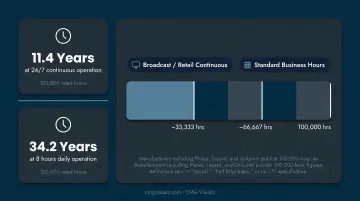
Commercial LED panels are rated by operational hours — major manufacturers including Planar, Leyard, and Unilumin publish 100,000-hour figures, though each defines this differently. Some specify "typical," others "half brightness," and others provide no L70 definition at all.
At 100,000 hours, that works out to roughly 11.4 years at 24/7 operation versus 34.2 years at 8 hours daily. Broadcast studios and retail signage running continuous loops consume rated lifespan three times faster than standard business-hours use.
How to Diagnose a Bad LED Panel Step by Step
Start with the simplest checks before touching any hardware. Most LED panel issues that look like hardware failures actually resolve at the controller or cabling level — and skipping that step wastes time and parts.
Step 1: Perform a Full Visual Inspection
Power on the display and run solid-color full-screen test patterns — white, red, green, and blue individually. Scan the panel surface systematically for:
- Dead pixels or dark clusters
- Dim zones or modules with lower brightness than surrounding tiles
- Color patches or hue inconsistencies
- Physical damage, yellowing, or scorched areas
Inspect at both close range and your normal viewing distance. Some color inconsistencies are only visible from the correct angle and distance.
Step 2: Check the Signal Chain and Controller Settings
Before touching a single module, rule out the signal path:
- Verify the sending unit (controller/processor) is outputting a signal
- Check that all data cables between cabinets are fully seated
- Confirm the software mapping in the controller matches the physical panel configuration
A misconfigured layout in controller software can make an entire section appear dead. Misdiagnosed controller issues routinely result in unnecessary module replacements — one of the costlier mistakes in LED troubleshooting.
Step 3: Isolate the Problem to a Specific Cabinet or Module
Swap the suspect module with a known-good module from a non-visible area of the display. Then observe:
- If the symptom moves with the module, the module itself is bad
- If the symptom stays in the same position, the fault is in the receiver card or power supply for that cabinet
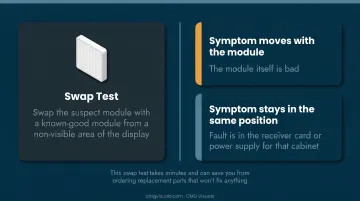
This swap test takes minutes and can save you from ordering replacement parts that won't fix anything.
Step 4: Inspect Power Supplies and Receiver Cards
Open the cabinet and look for:
- Blown or bulging capacitors on the power supply board
- Corrosion or burn marks on circuit boards
- Receiver card indicator light errors
NovaStar receiver cards — used across CMG Visuals' installed base — include onboard status LEDs that communicate specific fault conditions. On the A10s Plus-N, for example:
| Green LED Pattern | Meaning |
|---|---|
| Once every 1 second | Normal — card, Ethernet, and video input all good |
| Once every 3 seconds | Ethernet cable connection abnormal |
| 3 flashes every 0.5 sec | Ethernet normal, no video source detected |
| Once every 0.2 second | Application failed to load; backup program running |
These codes vary by model, so always consult the documentation for the exact card installed.
Step 5: Document the Pattern and Frequency
Log when and how failures occur:
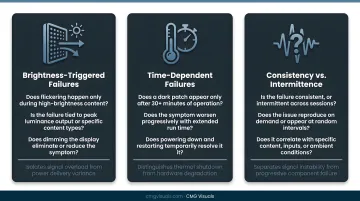
- Does flickering happen only during high-brightness content?
- Does a dark patch appear only after 30+ minutes of operation?
- Is the failure consistent, or intermittent across sessions?
Behavioral patterns distinguish thermal shutdown from signal instability from hardware degradation. That context gives any technician you bring in a meaningful head start and reduces diagnostic time on-site.
Common Mistakes When Troubleshooting LED Panels
Before pulling modules or calling for service, make sure you're not falling into one of these common traps:
- Assuming the problem is always the module. The actual cause is frequently a loose signal cable, misconfigured software, or a faulty receiver card. Replacing modules without isolating the root cause wastes money and rarely fixes the issue.
- Running full-brightness white screens during extended diagnosis. This stresses already-degraded LEDs and can accelerate failure. Use lower-brightness test patterns when inspecting a panel you suspect is compromised.
- Skipping the signal chain and jumping to physical disassembly. Most LED panel issues that appear to be hardware failures are resolved at the controller or cabling level. Physical disassembly should be the last step, not the first.
When to Repair, Replace, or Call a Professional
Unlike consumer displays — where backlight or panel repair is rarely worth pursuing — commercial LED walls are modular by design. Individual modules, receiver cards, and power supplies can all be replaced independently, making targeted repair almost always more cost-effective than full panel replacement.
When CMG Visuals was brought in on a failing P1.5 display at Methodist Hospital Dallas that three other vendors had declared irreparable, the team replaced dead pixels, failing hub boards, bad receiver cards, IC chips, and power supplies at the component level — without replacing the entire display. Modular architecture is what makes that level of targeted repair viable.
Full panel replacement makes sense only when structural damage is widespread across cabinets, compatible replacement parts are unavailable, or the display has exceeded its rated operational hours and is showing wall-wide degradation.
On warranty coverage: All CMG Visuals panels include:
- 5-year hardware warranty
- 10-year remote support warranty
- 2-year labor warranty
- Lifetime product support
If your display is within that warranty period, contact CMG Visuals before attempting any repairs — improper handling can void coverage. Reach the team at 214.714.2153 or sales@cmgvisuals.com.
When to escalate to a professional: Any of the following warrants a certified technician rather than further DIY diagnosis:
- Failures spreading across multiple cabinets
- Visible burn marks or physical thermal damage
- Power supply or controller faults that recur after replacement
- Safety concerns around power distribution or rigging
CMG Visuals' NovaStar-certified engineers handle diagnostics and repairs across Dallas-Fort Worth and nationwide, including on-site dispatch for active display failures.
Frequently Asked Questions
What are the most common symptoms of a bad LED panel?
The most visible signs are dead pixels, dark patches, color inconsistency between tiles, flickering sections, and cabinets that fail to power on. Symptoms typically appear in isolated zones rather than across the full display, which helps narrow the cause.
What causes an LED panel to fail?
The main causes are heat-related LED degradation, power supply instability or surges, physical impact from rough handling, and age-related wear from high-duty-cycle operation. In commercial environments, heat and power quality are the most common ongoing risk factors.
Is it worth repairing a faulty LED panel?
In most cases, yes. Commercial LED panels are modular, so replacing a single failed module or receiver card is significantly more cost-effective than replacing the full display.
Can a single bad LED module take down the entire display?
It depends on the wiring topology. A series-string failure can darken that string, while matrix-driver architectures with open-LED detection contain the impact more effectively. Either way, the modular design means the affected unit can be swapped without disturbing the rest of the wall.
How long do commercial LED panels typically last?
Major manufacturers rate commercial LED panels at 100,000 operational hours — roughly 11.4 years at 24/7 use, or 34.2 years at 8 hours daily. Actual lifespan depends on brightness settings, duty cycle, ambient temperature, and maintenance history.
When should I call a professional to inspect my LED panel?
Call a professional when failures are spreading across multiple cabinets, burn marks are visible, power or controller faults recur after parts replacement, or when the display is under warranty and DIY intervention could void coverage.