The short answer is that direct-view LED displays don't experience true burn-in the way those technologies do. But that's not the whole story. Under specific misuse conditions, LED displays can develop image retention, a related but distinct problem that's worth understanding before you commission a major installation.
This guide covers how LED burn-in actually works (and doesn't), what causes image retention, and what operators can do to prevent it from day one.
Key Takeaways
- True burn-in (phosphor or organic compound degradation) does not apply to LED displays
- Image retention from uneven LED aging is possible under prolonged static content at high brightness
- Heat, excessive brightness, and low-quality modules are the primary compounding causes
- Prevention requires brightness management, rotating content, and proper thermal installation
- Image retention is often correctable through calibration; severe cases may require module replacement
Can LED Displays Really Get Burned In?
To answer this properly, you need to understand what "burn-in" actually means at a physical level.
True burn-in occurs when static images permanently damage the light-emitting material inside a display. In CRT and plasma screens, that material is phosphor — a chemical compound that degrades unevenly when excited too long in the same pattern. In OLED panels, it's organic carbon-based semiconductor layers that break down similarly.
IEEE has documented how plasma operation is harder on phosphors than even CRT use — which explains why early plasma TVs developed visible ghost images after displaying news tickers or channel logos for months.
Direct-view LED displays work on an entirely different physical principle. Each pixel is an inorganic semiconductor diode that emits light independently. There are no phosphors, no organic compounds — so the classic burn-in mechanism simply doesn't apply.
LED Aging vs. True Burn-In
What can happen is something different: differential LED aging. As Daktronics documents, all LED technology slowly dims over time, and individual LEDs within a panel can degrade at different rates. When one region of a display accumulates significantly more operating hours than adjacent areas — due to static content or brightness imbalances — visible luminance differences can emerge across the panel.
That's image retention, not burn-in. Unlike true burn-in, image retention caught early can often be corrected through calibration — which is why the distinction matters in practice.
The LED Monitor Misconception
That aging behavior also depends on which type of "LED" display you're working with — and this is where a common mix-up creates real confusion.
Many monitors labeled "LED" are actually LCD panels with LED backlighting, not true direct-view LED. The distinction matters for durability:
- LCD with LED backlight: Subject to image persistence through the liquid crystal layer; more common in consumer monitors
- Direct-view LED (dvLED): Each pixel is its own independent LED diode; used in commercial video walls, broadcast studios, and event venues; far more durable under continuous operation
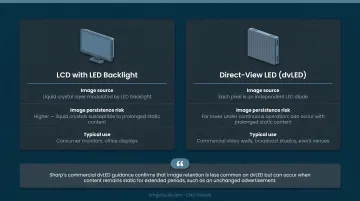
Sharp's commercial dvLED guidance confirms that image retention is less common on dvLED but can occur when content remains static for extended periods, such as an unchanged advertisement. The risk is real, even if it's far lower than on other display types.
What Causes Image Retention in LED Displays?
Image retention doesn't result from a single mistake — it builds from several compounding factors over weeks or months.
Cause 1: Running at Excessive Brightness
LED diodes lose luminance over time, a process measured across thousands of operating hours. Running a display at maximum brightness constantly accelerates that process — and does so unevenly if some areas of the screen are consistently brighter than others.
As Samsung documents, the commonly cited 100,000-hour LED lifespan rating marks the point where brightness drops to 50% of initial output — not total failure. That endpoint arrives sooner when displays run at full output continuously.
A lobby display or digital menu board running at 100% brightness for 16+ hours a day without calibration will age faster, and unevenly, compared to one operating within appropriate parameters.
Cause 2: Prolonged Static or High-Contrast Content
When a high-contrast image — a bright logo on a dark background, a fixed overlay graphic — occupies the same screen region for weeks without variation, the LEDs in that area accumulate disproportionately more operating hours than surrounding pixels. Over time, that area starts showing visibly lower brightness compared to the rest of the screen.
Common scenarios where this happens:
- Retail screens displaying the same branded background between content cycles
- Control room status displays with fixed interface elements
- Event venue screens left running the same idle screen for days between events
- Church displays showing a static logo at full brightness during services
Cause 3: Overheating and Poor Thermal Management
Heat is one of the primary drivers of LED degradation. Research from the IEA-4E Lighting Annex confirms that lumen depreciation rate is strongly correlated with LED junction temperature — the hotter the chip runs, the faster it ages.
An LED wall mounted flush against a wall without rear clearance — or installed without adequate HVAC — will run hotter and accelerate uneven aging. CMG Visuals addresses this directly in their installation practice: their guidelines specify managing heat buildup inside video wall systems and ensuring proper ventilation around installations to prevent heat accumulation.
Cause 4: Low-Quality or Mismatched LED Modules
Beyond heat, the hardware itself matters. Not all LEDs age at the same rate, and displays built from inconsistent diode batches develop visible luminance variation faster than those using matched, high-quality modules. This risk extends to repairs: Daktronics warns that a new replacement module may not exactly match surrounding modules because LEDs degrade over time. Their documented procedure involves placing the new module at the display perimeter and relocating an existing edge module to the failed position, then calibrating — precisely because module age-matching matters.
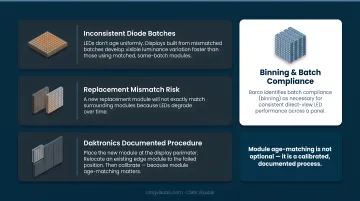
Barco similarly identifies batch compliance (binning) as necessary for consistent direct-view LED performance across a panel.
What Happens If LED Image Retention Is Ignored?
Left unaddressed, early-stage image retention progresses from a correctable uniformity issue to a permanent one.
What operators see as it worsens:
- Ghost outlines of previously displayed content that persist across content transitions
- Hotspots or dim regions that surface on solid-color and white test screens
- Visible color casts in zones that displayed a single hue for extended periods, noticeable against the surrounding panel
Once differential aging outpaces what calibration can correct, individual modules require replacement. Samsung's commercial guidance cites an average display lifespan of 7–10 years under normal use — neglected image retention can cut that short significantly, forcing early replacement cycles before the system would otherwise need them.
For broadcast studios, corporate boardrooms, and event venues, visible degradation carries real consequences beyond repair costs — on-air credibility, client impressions, and audience experience all take a hit when the display looks noticeably uneven.
Catching retention early is the difference between a software calibration fix and a module swap. Run a solid white or gray test screen periodically — uneven brightness, color casts, or ghost images on a clean background are all signs that differential aging has begun.
How to Prevent Image Burn in LED Displays
Prevention comes down to three things: smart configuration, disciplined content habits, and quality installation. Each is manageable from the start.
Calibrate and Manage Brightness Levels
Running commercial LED displays below maximum brightness extends LED lifespan and slows differential aging. NovaStar's NovaLCT platform — used in CMG Visuals' installations — supports time-period-based brightness rules and light-sensor-driven automatic adjustment, allowing displays to dim automatically during off-peak hours. NovaStar also documents that its Image Booster frame-by-frame brightness adjustment saves 20–40% power while extending display lifespan.
Match brightness output to the ambient environment. Running a display at full capacity when the room doesn't require it only accelerates wear.
Schedule Dynamic Content and Avoid Static Displays
No single pixel region should accumulate disproportionate operating hours. Practical steps:
- Rotate content playlists at minimum every few hours
- Replace static branding screens used as idle defaults with animated alternatives
- Schedule blank or low-brightness screens during overnight or off-hours periods
- Avoid permanent fixed overlays or persistent graphic elements on always-on screens
Ensure Proper Thermal Management During Installation
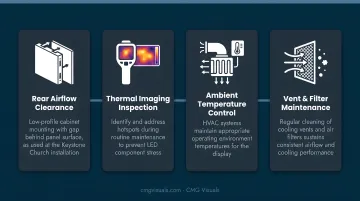
Professional installation directly impacts long-term LED health. CMG Visuals' approach includes:
- Maintaining rear clearance behind panels for airflow (the Keystone Church installation used a low-profile cabinet sitting slightly off the wall surface for this reason)
- Using thermal imaging to identify hotspots during maintenance
- Ensuring HVAC systems maintain appropriate ambient temperatures for the display's operating environment
- Cleaning cooling vents and air filters regularly to sustain airflow
Source Quality LED Panels with Matched Modules
Commercial-grade displays from reputable manufacturers, sourced in matched batches from the outset, resist premature uneven aging. This matters equally at the repair stage: replacement modules should come from the same production batch to prevent immediate color and luminance mismatches against aged panels.
CMG Visuals sources directly from tier 1 OEM suppliers, which means matched modules are available for the life of every installation. Combined with a 5-year hardware warranty and lifetime product support, that parts consistency is built in from day one — not retrofitted later.
Tips for Long-Term LED Display Health
These habits, built into a regular display management routine, extend panel life and reduce the risk of uneven wear over time:
- Full-color test every 3–6 months — cycle through solid red, green, blue, and white screens to spot luminance inconsistencies or uneven zones before they worsen
- Document brightness and content schedules for every installation — and train staff not to override them, since a single brightness spike can accelerate differential aging
- Log operating hours and maintenance events — this surfaces usage patterns that accelerate wear and supports any warranty claims down the line
- Use NovaCLB's pixel-level calibration periodically to rebalance visible uniformity across the panel; Barco and Daktronics both document similar calibration workflows for maintaining display consistency over time
- Power on displays at least once per month if they're out of service for extended periods — Unilumin recommends at least 2 hours of operation per month for displays in prolonged non-use
Frequently Asked Questions
Can LED displays get burned in?
True burn-in — permanent phosphor or organic compound degradation — does not occur in direct-view LED displays. However, differential LED aging from prolonged static content at high brightness can produce image retention effects, where certain areas of the panel become visibly dimmer than others over time.
Can LED burn-in be fixed?
Early-stage image retention is often addressable through calibration tools like NovaStar's NovaCLB, which rebalances brightness uniformity across the panel. Calibration cannot restore physically lost lumen output, and severe long-term aging may require module replacement.
What is the difference between LED burn-in and image retention?
True burn-in is permanent material degradation in phosphor or organic display types — not a risk for direct-view LED. Image retention in LED displays is a gradual luminance inconsistency from uneven LED aging — correctable in early stages and preventable with proper usage habits.
How long does a static image need to be displayed before LED image retention can occur?
No universal hour threshold exists — risk depends on brightness level, content contrast, ambient temperature, and LED quality. Extreme misuse conditions (maximum brightness, high-contrast static content, poor ventilation) compress that timeline significantly.
What types of content are most likely to cause image retention on LED displays?
High-contrast static content — bright logos on dark backgrounds, fixed overlays, persistent status graphics — displayed at high brightness over extended periods carries the highest risk, particularly in always-on commercial environments like retail signage, control rooms, or lobby displays.
How do I know if my LED display has image burn or just temporary image retention?
Display a solid white or gray test screen and observe whether uneven areas persist across content changes. If the inconsistency fades after rest or content cycling, it's likely early-stage retention. If the luminance difference persists no matter what's displayed, the aging may be permanent — a professional assessment is recommended.