Introduction
Walk into almost any professional environment today — a corporate boardroom, a house of worship, a broadcast studio, a sports arena — and you'll find an LED display driving the room's visual impact. The technology is everywhere. But most buyers evaluate these systems based on price alone, without understanding what they're actually buying.
That gap causes real problems. Organizations end up with displays that flicker on camera, wash out in sunlit lobbies, or look pixelated from normal viewing distances — not because they bought cheap, but because they bought without understanding the fundamentals.
This guide breaks down how LED displays actually work, from the physics of light emission to the signal chain that creates images, in plain language — so you know exactly what to look for before committing to a system.
Key Takeaways
- LED displays produce images using thousands of tiny red, green, and blue light-emitting diodes arranged in a grid — no backlight required.
- Signal flows from a video source through a controller and receiving cards to the LED modules that render the final image.
- Pixel pitch, brightness (nits), and refresh rate are the three specs that determine whether a display fits its environment.
- Indoor displays typically operate at 800–1,500 nits; outdoor displays require 5,000–10,000 nits for daylight visibility.
- Mismatching pixel pitch to viewing distance is the most common — and costly — LED purchasing mistake.
What Is an LED Display?
An LED display is a flat-panel screen that uses an array of light-emitting diodes directly as pixels to produce images, video, and text. Each LED emits its own light — the display doesn't need a separate light source behind it.
When most people hear "LED TV," they picture a consumer television. Those sets are actually LCD panels with LED backlighting: the LEDs illuminate a liquid crystal layer from behind, and that layer creates the image.
In a true direct-view LED display, as Sharp Business describes it, the LEDs are the image. There's no LCD layer involved.
Why This Distinction Matters
The self-emissive nature of direct-view LED gives it properties LCD simply can't match:
- Peak brightness that stays visible in sunlit lobbies, outdoor venues, and other high-ambient-light environments
- True black levels — dark pixels emit zero light, producing contrast ratios LCD can't approach
- Seamless scalability — modular panels tile together without bezels, bezels, or gaps
- Longer service life — no backlight array to degrade unevenly over time
Commercial LED displays are available in three configurations: monochrome (single-color text signs), bicolor, and full-color RGB. For corporate, broadcast, worship, events, and retail applications, full-color RGB is the standard — it's the only configuration capable of reproducing photographic imagery and live video at commercial quality.
How Does an LED Display Work?
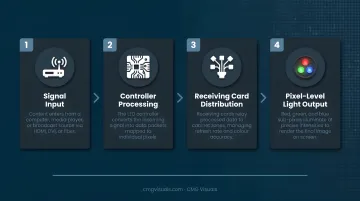
Every LED display operates through a four-stage sequence: signal input, controller processing, receiving card distribution, and pixel-level light output. Understanding this chain helps you anticipate how content behaves on screen and where problems originate when they appear.
Stage 1: Signal Input
The process begins at your video source — a computer, media player, camera, or video processor — which sends content to the LED controller via a data connection. The quality and resolution of that source sets the ceiling for what the display can show.
The controller receives and processes updated frames continuously throughout operation — not just at startup. Whatever your source outputs, the system works with it in real time.
Stage 2: Controller Processing and Color Creation
The LED controller decodes the incoming video signal, scales it to match the display's resolution, and divides the image data by screen zone. It's the system's central processor — translating digital content into precise pixel-level instructions for every part of the screen.
Color creation happens here through additive RGB mixing. Each pixel on the screen consists of three sub-LEDs — red, green, and blue. By varying the electrical current to each, the display mixes colors:
- Red + green = yellow
- Red + blue = magenta
- Green + blue = cyan
- All three at full intensity = white
In an 8-bit-per-channel system, each color channel has 256 possible intensity levels. That yields 256 × 256 × 256 = 16,777,216 possible color combinations, per Datavideo's technical reference on bit depth. NovaStar controllers — the control hardware CMG Visuals deploys across installations — also support 10- and 12-bit inputs for even finer grayscale processing.
Stage 3: Receiving Card Distribution
Receiving cards, mounted inside each LED cabinet, take the processed data from the controller and distribute pixel-level brightness and color instructions to individual LED modules. This is the layer that keeps the image unified across all panels.
Synchronization signals ensure every module updates simultaneously. Without proper sync, you get visual tearing or panels that update at slightly different times — a visible artifact that becomes obvious at close range or on camera.
Stage 4: Output and Final Image
Each LED module is a circuit board with LED chips mounted in a grid. When instructed by the receiving card, each red, green, and blue LED emits light at a specific intensity. Millions of these micro-adjustments, firing in sync, produce the final image.
Image quality at this stage depends on the entire signal chain staying intact. The most common causes of poor output in real installations:
- Cabling quality or length mismatches
- Underpowered supply units
- Resolution mismatches between source and display settings
Trace any image issue back through these four stages and you'll find the source.
Key Specs Every Buyer Should Understand
Most purchasing mistakes happen here — not because buyers can't read a spec sheet, but because they don't know which numbers actually matter for their environment.
Pixel Pitch
Pixel pitch is the center-to-center distance in millimeters between adjacent pixels. A smaller number means higher pixel density and sharper images — but also shorter optimal viewing distance.
A commonly used approximation: pitch in millimeters roughly equals minimum comfortable viewing distance in meters. This is a manufacturer heuristic, not a hard standard, and content type, resolution, and viewing angle all affect the real answer. But it's a useful starting point:
| Pixel Pitch | Typical Environment | Approx. Min. Viewing Distance |
|---|---|---|
| P0.9 – P1.5 | Boardrooms, broadcast studios | 1–2 meters |
| P1.9 – P2.6 | Worship sanctuaries, event stages, lobbies | 2–4 meters |
| P3.9 – P5 | Large venues, outdoor rental | 4–6 meters |
| P6 – P10+ | Outdoor billboards, large-format signage | 6–12+ meters |
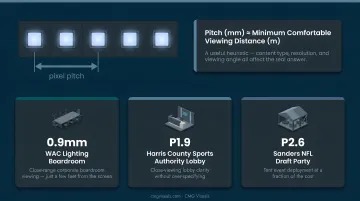
CMG Visuals' deployments reflect this directly. For WAC Lighting's corporate boardroom, the team selected a 0.9mm pixel pitch — essential for viewers seated just a few feet from the screen. For the Harris County Sports Authority lobby, a P1.9 delivered close-viewing clarity without over-specifying. For tent events like the Sanders NFL Draft party, P2.6 was the right call at a fraction of the cost.
Brightness (Nits)
Brightness is measured in nits (candelas per square meter). Getting this wrong is one of the costliest spec mistakes — it's not correctable through calibration after installation.
Benchmarks from manufacturer specifications:
- Indoor fixed displays: 800–1,500 nits (Leyard NEV and Daktronics indoor product ranges)
- Outdoor displays: 5,000–10,000 nits (Absen AW, Daktronics outdoor specifications)
- Daylight visibility threshold: Daktronics recommends at least 5,000 nits for displays that must be readable in direct sunlight
CMG Visuals' outdoor rental panels — including the P3.9 units deployed for the Texas Health Resources groundbreaking in Plano — are rated at 5,000 nits, which is the practical floor for outdoor daytime readability.
Refresh Rate
Refresh rate is how many times per second the display redraws its image, measured in Hz. For most viewers in most environments, anything above 1,920 Hz looks smooth.
Where it becomes critical is broadcast and live production. A camera shutter captures a fraction of a second of light — if the display's refresh rate isn't high enough, the camera sees partial scan cycles, which appear as rolling dark bands in recorded footage. Hz benchmarks for camera-facing applications:
- Livestream and broadcast: 3,840 Hz minimum (Absen recommendation)
- Demanding production environments: Up to 7,680 Hz on select Absen rental models
For CMG Visuals' broadcast work — including the Blaze Media election night studio deployment — display selection accounts for on-camera performance, not just in-room viewing quality.
SMD vs. DIP LED Technology
| SMD (Surface-Mount Device) | DIP (Dual In-line Package) | |
|---|---|---|
| Package size | Smaller, integrated RGB dies | Larger, separate leaded lamps |
| Viewing angle | Wide | Narrower, more directional |
| Best for | Fine-pitch indoor, rental, close viewing | High-brightness outdoor, large pitch |
| Outdoor use? | Yes — outdoor SMD products exist | Yes — traditional outdoor choice |
The old rule of "SMD = indoor, DIP = outdoor" no longer holds absolutely. Outdoor SMD products like the Absen AW series operate at up to 5,500 nits with IP65 weather protection. The better question is: what pitch and brightness does your environment require, and which package type delivers that most efficiently?
Types of LED Displays and Where They're Used
LED displays come in a few primary form factors, each tied to specific environment requirements:
- Fixed indoor LED walls — Corporate lobbies, broadcast studios, houses of worship, control rooms. Fine pixel pitch (P0.9–P2.6), 800–1,500 nits, permanent mounting.
- Outdoor LED billboards and signage — Building facades, roadside signs, stadium exteriors. Coarser pitch (P4–P10+), 5,000–10,000 nits, IP-rated weather protection.
- Modular rental displays — Events, trade shows, conferences, film production. Mid-range pitch (P2.6–P3.9), flexible configurations, transport-case packaging.
- Specialty configurations — Curved walls, floor displays, cylindrical builds, transparent LED for retail and architectural use.
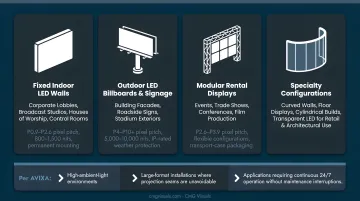
According to AVIXA, direct-view LED consistently outperforms projection in three specific scenarios: high-ambient-light environments, large-format installations where projection seams are unavoidable, and applications requiring continuous 24/7 operation without maintenance interruptions.
CMG Visuals' NovaStar-certified team has deployed across all of these categories — including a P1.25 fine-pitch broadcast studio wall for Blaze Media and rental panels at American Airlines Center for the Dallas Mavericks. Every project starts with the environment: brightness requirements, viewing distance, and use case drive the spec, not the other way around.
Conclusion
LED displays combine semiconductor light emission, RGB color mixing, and a layered signal-processing chain to produce images that projectors and LCD panels can't replicate in demanding environments. Once you understand that chain — source to controller to receiving card to LED module — specs like pixel pitch, brightness, and refresh rate become readable. Each number tells you precisely what a display will and won't do in a given environment.
That knowledge translates directly to better purchasing decisions — fewer mismatches, less waste, and displays that actually perform where they're installed. For organizations ready to put those questions to use, CMG Visuals provides direct consultations with NovaStar-certified engineers who spec each system to the specific space, not a generic template. Every sold display includes a five-year hardware warranty and lifetime product support.
Frequently Asked Questions
How do true LED displays work?
True direct-view LED displays use individual LEDs as pixels that emit their own light directly. LED-backlit LCDs work differently — LEDs sit behind a liquid crystal panel and illuminate it from behind, rather than forming the image themselves.
What is pixel pitch and why does it matter?
Pixel pitch is the millimeter distance between the centers of adjacent pixels. A smaller pitch means higher resolution and a shorter optimal viewing distance. Choosing the wrong pitch — too coarse for a close-viewing boardroom, or too fine for a large outdoor billboard — is one of the most common and costly LED purchasing mistakes.
What is the difference between indoor and outdoor LED displays?
The two main differences are brightness and weatherproofing. Outdoor displays require 5,000–10,000 nits to remain visible in sunlight, compared to 800–1,500 nits for indoor use. Outdoor cabinets also carry IP ratings (typically IP65) that protect against rain, dust, and temperature extremes.
How long do LED displays last?
Daktronics defines 100,000 hours as the point at which its LED displays reach half their original brightness — not the point of failure. AVIXA and Unilumin cite operational ranges of 50,000–100,000 hours, with real-world lifespan shaped by temperature, humidity, power stability, and maintenance.
What is the difference between SMD and DIP LED displays?
SMD LEDs are smaller, support finer pixel pitches, and deliver wider viewing angles — the right fit for most indoor fine-pitch applications. DIP LEDs are physically larger and more rugged, built for outdoor high-brightness environments, though modern outdoor SMD products have largely closed that performance gap.
Is an LED display better than a projector for professional environments?
In most professional environments, yes. LED displays outperform projectors in ambient light, need no bulb replacements, and can run 24/7 for years without image degradation. For large-format temporary setups, a projector's throw range has its place — but for permanent installations, direct-view LED is the stronger long-term choice.