This guide covers the three main LED display technologies, how pixel pitch and panel cabinet dimensions work together, and how to match those specs to your actual environment — whether that's a corporate boardroom, a house of worship, a broadcast studio, or an event stage.
Key Takeaways
- SMD, COB, and Mini/Micro LED technologies each offer distinct durability profiles and use cases
- Pixel pitch (center-to-center distance between pixels, in mm) is the single most important sizing metric for video walls
- Standard panel cabinets run 500×500mm or 500×1000mm; total screen size comes from tiling those panels together
- Match pixel pitch to your minimum viewing distance to avoid overspending or under-specifying
- Using indoor-rated displays outdoors is one of the costliest spec mistakes you can make
What Is an LED Size Chart — and Why Does It Matter?
An LED size chart is a reference tool that maps display technologies, pixel pitches, and panel dimensions to their intended applications. For anyone buying, specifying, or integrating a video wall, it answers a fundamental but often misunderstood question: what do I actually need for this space?
In the context of LED video walls, "size" means two separate things:
- Pixel pitch — the center-to-center distance between adjacent pixels on the display surface, measured in millimeters
- Cabinet dimensions — the physical panel frames that tile together to form the full screen
This distinction matters because two LED walls can occupy identical wall space while delivering dramatically different image quality. A 4×2 meter wall built at P1.5 and the same wall built at P4 look identical from across the room in a photograph — but they're not the same display. Pixel pitch directly determines how close a viewer can stand before the image looks sharp rather than pixelated — which is exactly what an LED size chart helps you get right before a single panel is ordered.
Types of LED Displays: Technology, Dimensions & Use Cases
LED displays aren't a single product category. Three distinct technologies drive most commercial installations today, each with its own construction method, dimensional profile, and optimal environment.
SMD LED Displays
SMD (Surface-Mount Device) panels account for the majority of video wall installations across commercial markets. Individual red, green, and blue LED chips are surface-mounted onto a PCB in clusters — each cluster forming one pixel. Display buyers specify SMD panels by pixel pitch (P1.5, P2.5, P3.9, etc.) rather than component size.
Where SMD excels:
- Indoor corporate lobbies, conference rooms, and boardrooms
- Houses of worship and auditoriums
- Broadcast studios and broadcast-adjacent environments
- Retail showrooms and event venues
- Typical pitch range for these spaces: P1.2 to P4
Strengths include a wide pitch range, strong color accuracy, broad parts availability, and competitive pricing at scale. Viewing angles typically run 120°–140°.
Worth noting on the limitations side:
- Individual diodes are exposed — moisture, dust, and physical contact can dislodge chips in high-traffic or outdoor settings
- Fine pitches below P1.5 carry a significant cost premium
COB LED Displays
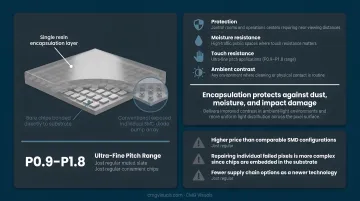
COB (Chip-on-Board) eliminates individually exposed diodes entirely. Bare LED chips are bonded directly onto a substrate, then encapsulated together under a single resin or phosphor layer — producing a smooth, protected pixel surface instead of the component-by-component structure found in SMD.
Where COB excels:
- Control rooms and operations centers requiring near-viewing distances
- High-traffic public spaces where touch resistance matters
- Ultra-fine pitch applications (P0.9–P1.8 range)
- Any environment where cleaning or physical contact is routine
The encapsulation layer is COB's defining advantage. It protects against dust, moisture, and impact damage while delivering improved contrast in ambient-light environments and more uniform light distribution across the pixel surface.
On the downside:
- Higher price than comparable SMD configurations
- Repairing individual failed pixels is more complex since chips are embedded in the substrate
- Fewer supply chain options as a newer technology
Mini LED and Micro LED Displays
Mini LED for direct-view displays uses chips smaller than 200 µm, enabling pixel pitches below P0.9 — and in high-end Micro LED configurations, below P0.5. This is distinct from the Mini LED backlight technology found in some LCD TVs; each LED chip here is individually addressable in a fully self-emissive array.
Cost is the primary limiting factor for Mini and Micro LED. Price per square meter runs significantly higher than SMD or COB, and manufacturing complexity, limited parts availability, and narrower supplier options mean this technology isn't cost-justified for most standard commercial applications.
Where Mini/Micro LED earns its premium:
- Broadcast studios requiring zero moiré in camera-facing displays
- Luxury corporate boardrooms with very short viewing distances
- Control rooms where pixel-level precision at arm's reach is required
- High-end retail and hospitality where display quality is part of the brand
LED Panel Dimensions and Pixel Pitch Explained
Cabinet Sizes and Tiling
Every video wall is built by tiling individual LED cabinets — aluminum or die-cast frames holding the LED modules. The most common cabinet sizes are:
| Cabinet Size | Typical Use |
|---|---|
| 500×500mm | Rental/event displays; fast magnet-mount setup |
| 500×1000mm | Fixed indoor installations |
| 600×337.5mm | Fixed indoor 16:9-native panels (e.g., Barco NT1.5) |
| 960×960mm | Outdoor modules |
CMG Visuals' 101/201 F Series panels use 500×500mm and 1000×500mm cabinets, while the 1609 Series uses 600×337.5mm panels — a cabinet dimension that is itself a 16:9 ratio, making it inherently widescreen-native. The WAC Lighting installation at the World Trade Center in Dallas used 36 of these panels to produce a 163-inch 4K display.
That tiling difference matters in practice: a 500×500mm square cabinet requires specific row-and-column math to approximate a 16:9 screen, while a 600×337.5mm panel reaches that ratio naturally.
Pixel Pitch Reference Table
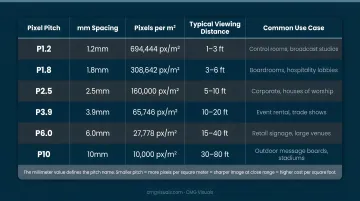
The millimeter value defines the pitch name — a P2.5 display has 2.5mm center-to-center pixel spacing. Smaller pitch means more pixels per square meter, which means a sharper image at close range and a higher price per square foot.
| Pixel Pitch | Min. Viewing Distance | Typical Application |
|---|---|---|
| P0.9–P1.5 | Under 2 meters | Boardrooms, broadcast studios, control rooms |
| P1.5–P2.5 | 2–4 meters | Conference halls, churches, retail showrooms |
| P2.5–P4 | 4–7 meters | Event stages, mid-size auditoriums |
| P4–P8 | 7–15 meters | Large venues, outdoor-adjacent stages |
| P8–P16 | 15+ meters | Outdoor billboards, building facades |
Why Total Pixel Count Matters More Than Screen Size
Choosing pixel pitch isn't just about viewing distance — it directly determines how many pixels fit your screen. A larger display doesn't automatically mean a better image; total pixel count, shaped by both screen area and pitch, is what defines real resolution.
Take a 3×2 meter wall:
- At P2.5: approximately 960,000 pixels
- At P4.0: approximately 375,000 pixels
That's a difference of 585,000 pixels across the same physical footprint. From 3 meters away, those two displays look completely different.
Indoor vs. Outdoor Dimensional Differences
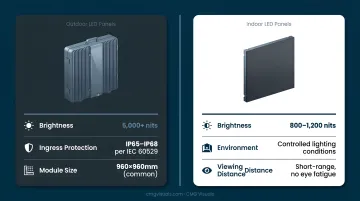
Outdoor panels are built around different priorities than indoor:
- Larger modules (960×960mm is common) for structural durability
- IP65–IP68 ratings per IEC 60529 for ingress protection against weather
- Brightness of 5,000+ nits to compete with direct sunlight (CMG Visuals' outdoor displays are rated at 5,000 nits)
Indoor panels, by contrast, typically run 800–1,200 nits — enough for controlled lighting environments without causing eye fatigue at short viewing distances.
How to Choose the Right LED Display Size for Your Space
Start With the Room, Not the Budget
The right specification starts with physical reality: ceiling height, room depth, ambient light levels, and the minimum distance between the screen and the closest viewer. Budget is a constraint that shapes the solution, not the starting point.
The Minimum Viewing Distance Formula
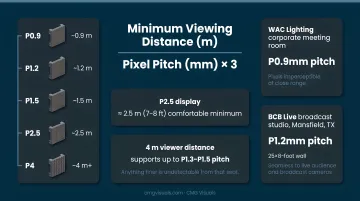
A practical industry rule of thumb: minimum comfortable viewing distance (in meters) ≈ pixel pitch (in mm) × 3. So a P2.5 display is generally comfortable from about 7–8 feet (roughly 2.5 meters) and beyond.
Work backward from your room: if your closest viewer sits 4 meters away, that supports up to roughly a P1.3–P1.5 pitch before image quality degrades. Anything finer is undetectable from that seat.
Two CMG Visuals installations show this formula in practice:
- WAC Lighting corporate meeting room: P0.9mm pitch for a display where participants sit within a few feet — pixels are imperceptible even at close range
- BCB Live broadcast studio (Mansfield, TX): P1.2mm pitch on a 25×8-foot wall, ensuring the surface read as seamless to both a live audience and broadcast cameras
Environmental Factors by Setting
| Environment | Priority | Typical Pitch | Notes |
|---|---|---|---|
| Corporate boardroom | Pixel pitch, color accuracy | P0.9–P1.5 | Close-range clarity is everything |
| House of worship | Screen size, brightness | P1.5–P2.5 | Balance audience distance with budget |
| Broadcast studio | Ultra-fine pitch, refresh rate | P1.2–P1.9 | Camera proximity drives spec |
| Event/rental stage | Fast setup, durability | P2.5–P3.9 | 500×500mm magnet-mount cabinets preferred |
| Outdoor signage | Brightness, weatherproofing | P4–P10 | IP65+ and 5,000+ nits non-negotiable |
CMG Visuals' NovaStar-certified engineers evaluate each installation individually, matching specifications to the actual environment. Direct OEM sourcing means the recommended pitch and cabinet configuration reflects your space — not whatever a distributor has sitting in a warehouse.
Mistakes to Avoid When Selecting LED Display Sizes
Over-Specifying Pixel Pitch
The most common and expensive mistake: buying a fine pixel pitch for an application where the audience can't perceive it. Installing a P1.5 display in an auditorium where the closest seat is 8 meters away delivers zero visible benefit over a P3.9 — but the price difference is substantial.
Start with viewing distance, then specify the coarsest pitch that still delivers a seamless image at that range — that's where you get the best performance per dollar spent.
Ignoring Ambient Light
Brightness is the most overlooked spec in the industry. An indoor-rated display at 800–1,000 nits placed in a sunlit atrium or semi-outdoor venue will appear washed out — regardless of how fine the pixel pitch is. Always confirm:
- What is the ambient light level in the installation space?
- Does the display brightness specification match that environment?
- Is the IP rating appropriate if the display is near windows, weather, or high humidity?
A brightness mismatch in high-ambient environments doesn't just reduce image quality — it renders the display functionally useless and often requires a full panel swap to correct.
Getting the Panel Math Wrong
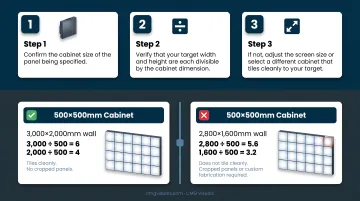
If your desired screen dimensions don't divide cleanly into the cabinet size you're specifying, you'll end up with cropped panels, visible seams, or expensive custom fabrication.
Before finalizing any screen dimension:
- Confirm the cabinet size of the panel being specified
- Verify that your target width and height are each divisible by the cabinet dimension
- If not, adjust the screen size or select a different cabinet that tiles cleanly to your target
For example, a 500×500mm cabinet tiles to screen dimensions that are multiples of 500mm. A 3,000×2,000mm wall works perfectly. A 2,800×1,600mm wall does not.
Frequently Asked Questions
What sizes do LEDs come in?
LED video walls span pixel pitches from P0.9 and below (broadcast and boardroom applications) through P2–P4 for indoor events and commercial displays, to P8–P16 for outdoor billboards. Physical panel cabinets most commonly measure 500×500mm or 500×1000mm, with total screen size determined by how many panels you tile together.
What pixel pitch is best for indoor LED displays?
It depends on your minimum viewing distance. P0.9–P1.5 for close-range environments like boardrooms and broadcast studios; P1.5–P2.5 for churches and conference halls; P2.5–P4 for larger auditoriums and event stages. Always spec from the closest viewer's seat outward — never default to the finest pitch available.
What is the standard size of an LED video wall panel?
The most common rental cabinet is 500×500mm; fixed indoor installations frequently use 500×1000mm or 600×337.5mm panels. Outdoor modules tend to run larger, often 960×960mm. Final screen dimensions are determined by how many panels are combined — there's no single "standard" screen size.
What is the difference between SMD and COB LED displays?
SMD mounts individual LED chip clusters onto a PCB: widely available, cost-effective, and solid for most indoor use cases. COB bonds bare chips directly onto a substrate under a protective layer, delivering better durability, improved contrast, and stronger performance at ultra-fine pitches. It costs more, but it's the right call for high-traffic or demanding near-view environments.
How do I know what size LED display I need for my venue?
Start with your minimum and maximum viewing distances to determine the appropriate pixel pitch range, then calculate screen dimensions based on your content's aspect ratio and available wall space. A certified LED display specialist can validate that spec against your actual environment — that step prevents most costly mistakes.
How far should viewers be from an LED display?
A reliable rule of thumb: minimum viewing distance in meters equals roughly three times the pixel pitch in millimeters. A P2.5 display is comfortable from approximately 7–8 feet onward.